Earwormy masters your track right inside FL Studio and Ableton. At home, on the road, wherever you are: hit Master and your track is release-ready in seconds.
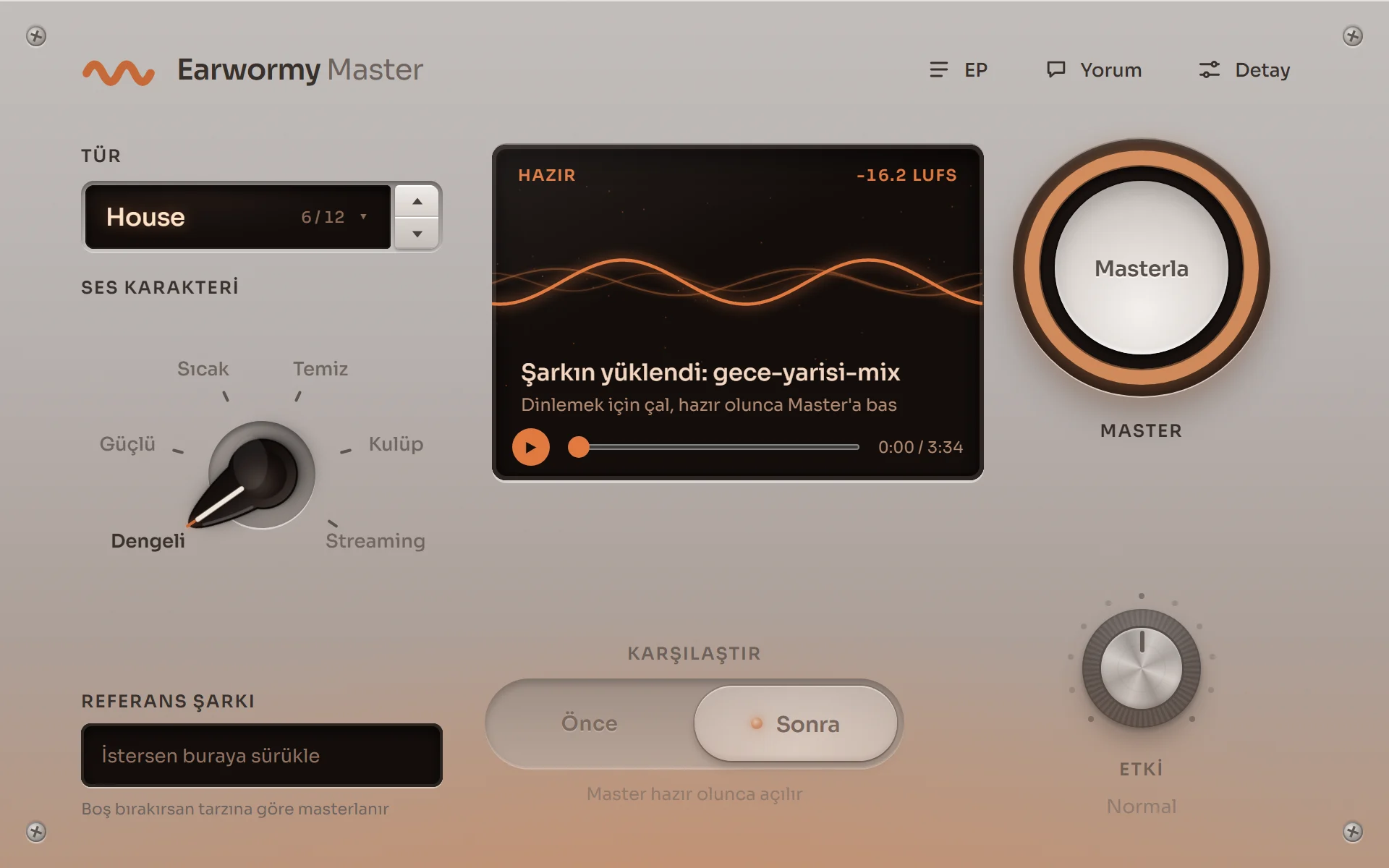
An example track plays and Wormy masters it right in front of you.
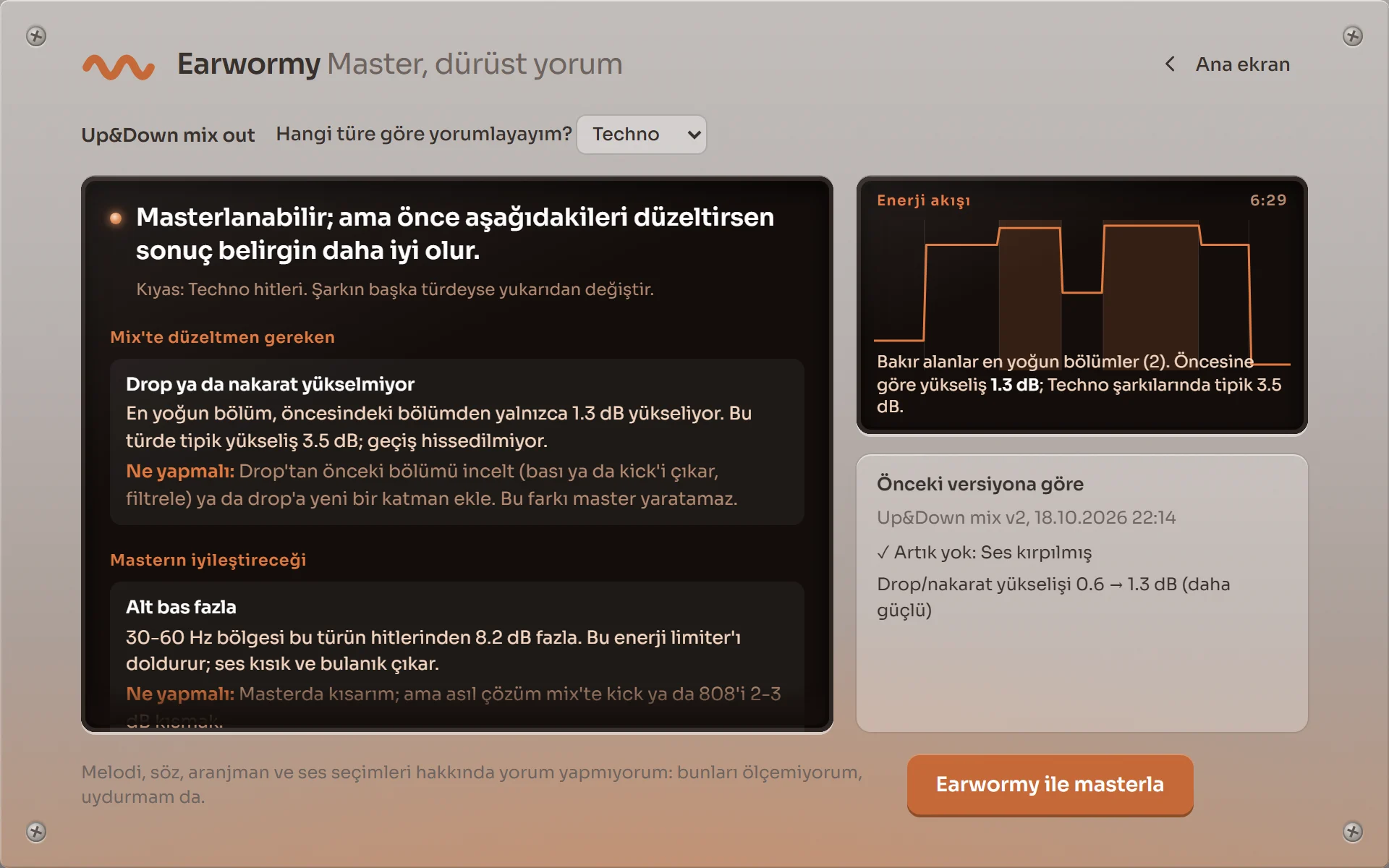
The plugin's real screen: Honest Feedback.
First, it listens.
Put the plugin on your master channel and play your track. Earwormy compares it with hits in its genre: bass, brightness, width and loudness. It tells you straight what's missing.
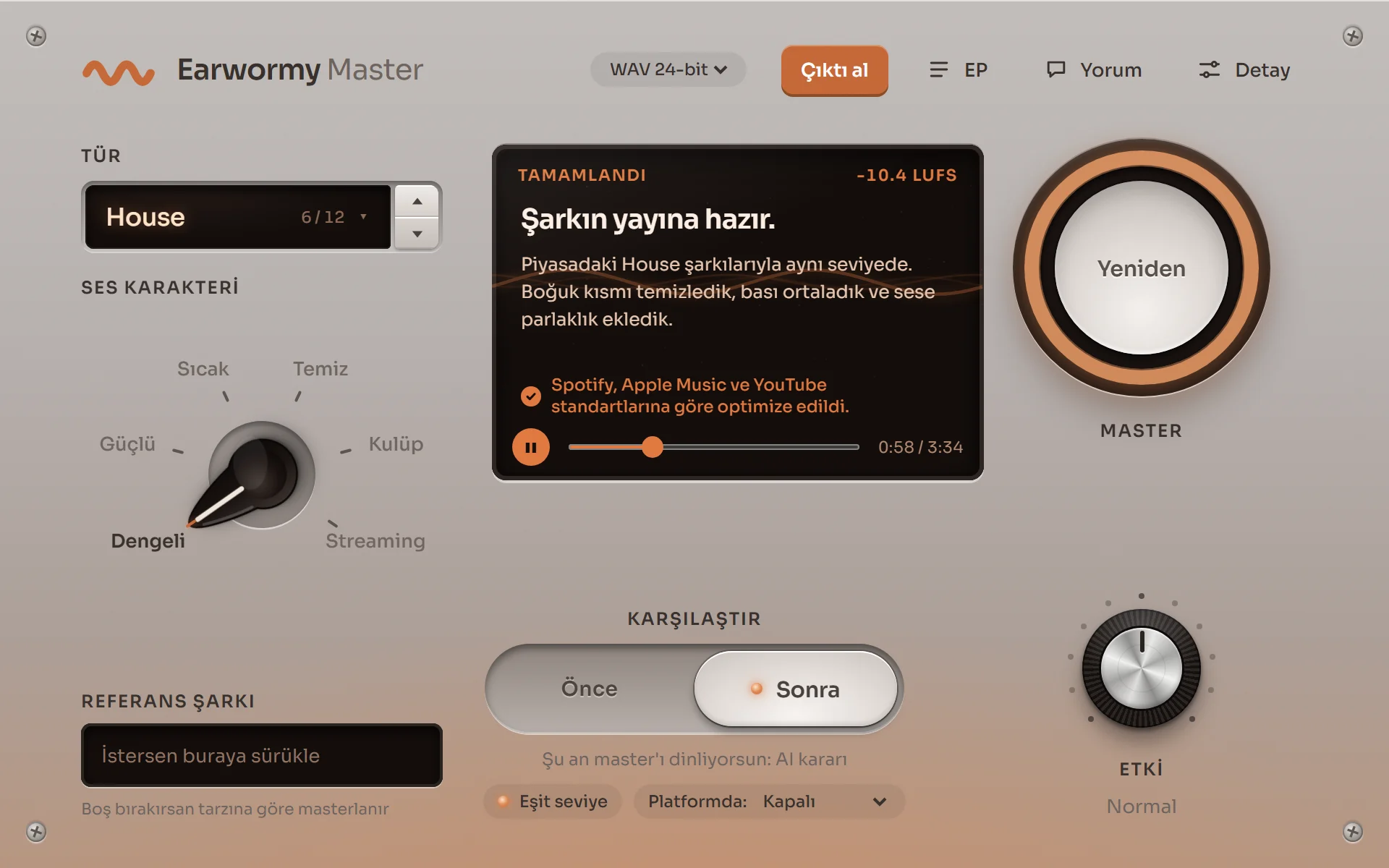
The plugin's real screen: master result.
Then, it masters.
You hit Master and it's done in seconds. Switch between Before and After and hear the difference yourself.
Nerepla, "Up&Down". Before: the raw mix, nothing on the master channel. After: Earwormy's master (Techno, Balanced) at its own loudness.
From Spotify to Beatport, release-ready.
Spotify, Apple Music, YouTube Music and Beatport. You pick the genre, Earwormy does the rest; for the club, just choose the Club character. Your track never leaves your computer.
Walk: W A S D or arrow keys. Zoom: mouse wheel or + and −. You can also click the labels to go there.
Studio: before and after
The first track is a real raw mix: Nerepla's "Up&Down", exported with nothing on the master channel and mastered with Earwormy (Techno, Balanced). The other three were already mastered and released, so the difference there is smaller. With Equal level on you hear only the tonal difference; with it off you also hear the master's loudness. You can switch while it plays; the track continues where it was.
"Up&Down" used with Nerepla's permission. Other tracks are CC BY licensed (archive.org): Jukka-Pekka Kervinen "Rarely Hector", Digi Hartatak "San Pedro", Deadman & Digi Hartatak ft. MC J-Me "Knowledge is Painful". 30-second excerpts. "After" was mastered with Earwormy; "Before" is the released original file.
Living room: Wormy on TV
Wormy's first Reel. New episodes on Instagram: @earwormyaudio
The poster on the wall: Honest Feedback
You play your track to a friend and they say “sounds good”. Your family says “amazing”. Nobody wants to hurt your feelings, so nobody tells you why your bass sounds like mud.
Earwormy does. It shows what's missing with numbers and explains how to fix it in the mix. If it's something the master can handle, it does that for you too.
An excerpt from the feedback the plugin wrote for a real Techno mix, translated (the plugin speaks Turkish for now; English is on the way):
Ready to master, but fixing the points below first will make the result clearly better.
Too much sub bass: the 30-60 Hz range is 8.2 dB above Techno hits. I can pull some of it down in the master; the real fix is lowering the kick or 808 by 2-3 dB in the mix.
It doesn't comment on melody, lyrics or arrangement. It never makes up what it can't measure.
The beta is opening on Windows for FL Studio and Ableton. Leave your email and we'll send you the installer when it's your turn.
House tour complete
You've explored all of Wormy's house. If there's a track waiting in your folder, it's its turn now. Join the beta and let's do your first master together.
Earwormy Master is a VST3 plugin you put on the master channel in FL Studio and Ableton Live. It compares your track with hits in its genre, makes a release-ready master and tells you clearly what it did. Your track never leaves your computer.
Pick your genreChoose one of 12 genres and a sound character. Earwormy knows the target.
Hit MasterIt's done in seconds and tells you what it did in plain sentences.
Listen, compare, releaseBefore and after at the same level. It's honest about what your mix is missing, too.
Bedroom studio
Hit Master. Earwormy does the rest.
Pick your genre and your track speaks the same language as its hits.
It tells you in plain sentences what your mix is missing and how to fix it.
You hear before and after at the same level, so louder can't fool your ears.
Pro
A first pass in seconds. The final word is yours.
Drop in a reference track and see, as a percentage, how close you get in tone, punch and dynamics.
Open every decision in the advanced settings, change it and make it your sound.
24-bit or TPDF-dithered 16-bit export, -1 dBTP peak safety, consistent loudness in EP mode.
-14 LUFSHear Spotify and YouTube Music normalization inside the plugin
-1 dBTPPeaks that don't clip after streaming encoding
12 genresFrom Trap to Techno, every track is compared with hits in its own genre
0 uploadsAnalysis and master both run on your computer; your track never goes to a server
Honest FeedbackThe people around you say “sounds good” and move on. Earwormy tells you with numbers what your mix is missing: what you should fix in the mix and what the master will handle.
Platform preview
Hear inside the plugin how your track will play on Spotify, Apple Music and YouTube Music. A louder master doesn't play louder there.
Club character
A loud, punchy master for tracks going to Beatport and DJ sets. For streaming platforms you choose Streaming.
Make it release-ready
If something is still off after the master, one click takes another pass and measures what actually improved.
EP and album mode
Masters several tracks together at a consistent level. Mark the ones you want to stay calm.
Trust your ears, not us.
The blind test has four tracks. Each has one Earwormy master and one human master at the same level, and you pick without knowing which is which.
Put the plugin on the master channel in FL Studio or Ableton.
Play your track or drop in the file, and pick your genre.
Hit Master. Compare before and after, fine-tune if you like, export.
FAQ
Which DAWs does Earwormy work in?
FL Studio and Ableton Live, as a VST3 plugin for Windows. A macOS version is next.
Is my track uploaded anywhere?
No. Analysis and mastering both run on your computer; your track is never sent to a server.
How loud should my master be for Spotify?
Spotify brings tracks to about -14 LUFS. A louder master doesn't play louder there, it just sounds more squashed. Earwormy's Platform preview lets you hear this for yourself.
Does Earwormy replace a mastering engineer?
An experienced engineer's ears and judgement are something else. Earwormy gives you a measured, release-ready master for every track you can't send to an engineer, and tells you exactly what it did.
Will Earwormy tell me if my mix has problems?
Yes. Honest Feedback reports everything it can measure: which problems the master will fix and which ones you should fix in the mix. It doesn't make up opinions about things it can't measure, like melody, lyrics or arrangement.
Join the beta
The beta is opening on Windows for FL Studio and Ableton. Leave your email and we'll send you the installer when it's your turn. You can also join our blind listening test: you listen and choose without knowing which master is Earwormy's.